
|
||||||

Creation Calendar
The Creation Calendar shows Hebrew 








Isaiah 53 from the Aleppo Codex













Welcome to Torahcalendar.com
The Calendar Restoration Project is a historical work in progress to restore the Creation Calendar of Scripture.
Based on the whole counsel of Scripture, it is evident that the Creation Calendar is a 7000 year calendar modeled
on the seven days of creation. It is composed of 140 Jubilee Cycles of 50 years.
From Psalm 90:4 and 2 Peter 3:8, the Scriptures teach that the Seventh Millennium, which is the Millennial Sabbath and the Age of Life with יהושע Messiah, will begin after 6000 Years since the true epoch of creation. We believe the Sabbaths, New Moons, Appointed Times and Festivals of יהוה have been correctly restored. We also believe that this site correctly teaches how to determine the Hebrew Hour, Hebrew Day, Hebrew Month and Hebrew Year. We are watching, hoping, and praying that the Messiah will come soon. The final goal of the Calendar Restoration Project is to successfully determine the true epoch of creation. יהושע Messiah is not delaying His coming, but will come on time at the restoration of all things as prophesied by Peter in Acts 3:21. We must all keep watching as the Master has said, to see something many have longed to see - the resurrection of the just. By entering this website you acknowledge that the date posted for the epoch of creation is provisional, and is conditional upon historical proof which is not yet published. Certain very ancient historical dates before Moses which are provided in articles on this site should still be considered provisional at this time. 
Determining the Hebrew DayA Hebrew Day begins and ends at the moment of sunset on the Creation Calendar. 
Leviticus 23:27-32 "Also the tenth day of this seventh month shall be the Day of Atonement. It shall be a set apart convocation for you; you shall afflict your souls, and offer an offering made by fire to יהוה . And you shall do no work on that same day, for it is the Day of Atonement, to make atonement for you before יהוה your Elohim. For any person who is not afflicted in their soul on that day shall be cut off from his people. And any person who does any work on that day, that person will I destroy from among his people. You shall do no manner of work. It shall be a statute throughout the ages throughout your generations in all your dwellings. It shall be for you a Sabbath of rest, and you shall afflict your souls; on the ninth day of the month at evening, from evening to evening, you shall celebrate your Sabbath." The time of sunset is defined as the moment the trailing edge of the sun's disc disappears below the horizon to the west, as seen by an observer at a particular location on earth. At sunset, the true position of the sun is about one sun diameter below the horizon, yet delayed visibility occurs due to the bending of light through the atmosphere as a result of refraction. Sunset should not be confused with night. The time between sunset and night is called evening twilight. The time between night and sunrise is called morning twilight. 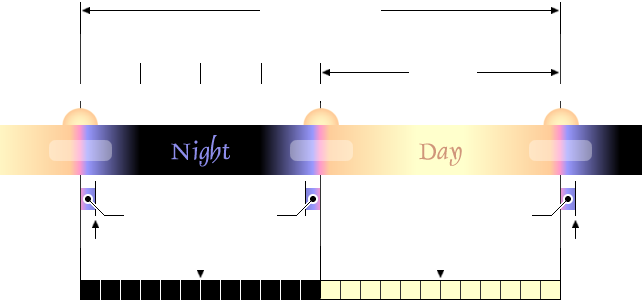
A Typical Hebrew Day One Hebrew Day
Genesis 1:5 Elohim called the light Day and the darkness
He called Night. 12 Hours
John 11:9 Are there not
First
Second
Third
Fourth Sunset Evening
"Twinkling of an eye" Sunrise Morning Sunset Evening
Evening
"Twinkling of an eye"
Morning
Between the בין הערבים (Evening Twilight) 1 1 2 2 3 3 4 4 5 5 6 6 7 7 8 8 9 9 10 10 11 11 12 12 Mid-day Hebrew Day Hours Mid-night Hebrew Night Hours A Hebrew Day consists of 12 Hebrew Night Hours and 12 Hebrew Day Hours. The midpoint of the 12 Hebrew Night Hours is called Mid-night. The moment of Mid-night occurs exactly halfway between sunset and sunrise separating the sixth and seventh Hebrew Night Hours. The midpoint of the 12 Hebrew Day Hours is called Mid-day. The moment of Mid-day occurs exactly halfway between sunrise and sunset separating the sixth and seventh Hebrew Day Hours. An easy way to measure Day Hours is by using an equiangular sundial marked with 12 divisions. A Hebrew Day begins at sunset and transitions from evening twilight to night to morning twilight to day to sunset. The first half of a Hebrew Day lasts from the moment of sunset to the moment of sunrise. The Scriptures divide the time between sunset and sunrise into four watches each containing three Hebrew Night Hours. The second half of a Hebrew Day lasts from the moment of sunrise to the moment of sunset. Sunrise is defined as the instant at which the upper edge of the sun's disc appears above the horizon in the east, as seen by an observer at a particular location on earth. As atmospheric refraction causes the sun to be seen while it is still below the horizon, both sunrise and sunset are in a sense optical illusions. The second half of a Hebrew Day lasts from the moment of sunrise to the moment of sunset. The period between sunset and night is defined by the Hebrew phrase בין הערבים - between the evenings. This is the time of evening twilight. This phrase has been mistranslated in the Tanach as afternoon. It appears in the Torah as the time when the Israelites would eat quail (Exodus 16:12), as the time when the Menorah was to be lit (Exodus 30:8), as the time when the evening sacrifice was to be offered (Exodus 29:38-41), and as the time when the Passover was to be slain (Exodus 12:6). It is the whole counsel of Scripture on the Passover which proves that the Hebrew phrase בין הערבים - between the evenings - refers to the time of evening twilight. יהוה said that all of the ceremonies of the Passover occur on Day 14 of Month 1 (Numbers 9:3). In the Passover of the Exodus, a lamb was slain after sunset, the death angel passed over at midnight, and the leftovers were burnt before morning on Day 14 of Month 1 (Exodus 12:3-29). The Scriptures clearly distinguish between the Passover on Day 14 of Month 1 and the seven days of Unleavened Bread which begin on Day 15 of Month 1 (Leviticus 23:5-6). These facts have caused scholars to conclude that the Hebrew phrase בין הערבים - between the evenings - refers to the period between sunset and night or evening twilight. In Hebraic thought, evening twilight is understood as a transitional period between day and night. It is currently understood that it is evening twilight as long as two stars of medium magnitude are visible, but it is night upon the appearance of a third star of medium magnitude. In ancient times, some understood that night begins in a moment in time which is impossible to determine called the twinkling of an eye. This is interesting, as Paul prophesied that the righteous would be resurrected in the twinkling of an eye.
1 Corinthians 15:51-52 Behold, I tell you a secret; We will not all sleep, but we will all be changed. In a moment, in the twinkling of an eye, at the last trumpet, for it shall sound, and the dead shall be raised incorruptible, and we shall be changed. Paul's use of the phrase the twinkling of an eye aligns perfectly with the ancient understanding. The exact moment night begins therefore remains a little mysterious in Hebraic thought. In contrast, the modern world subdivides evening twilight into three definitive subcategories. Evening civil twilight begins at sunset and ends when the center of the sun is 6° below the horizon. Nautical twilight is when the center of the sun is between 6° and 12° below the horizon where navigation via the horizon at sea is not possible. Astronomical twilight is when the center of the sun is between 12° and 18° below the horizon where the sky is dark enough for astronomical observations. Morning civil twilight begins when the center of the sun is 6° below the horizon and ends at sunrise. 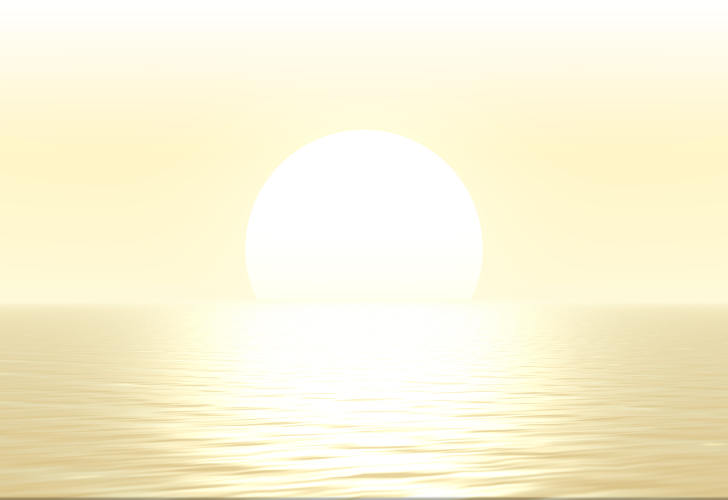
Finding Your Local Sunset Time Select YES in the Summer, NO in Winter.
How to Use the Sunset Calculator
|
| Longitude: | Latitude: |
| Positive in Western Hemisphere | Positive in Northern Hemisphere |
| Negative in Eastern Hemisphere | Negative in Southern Hemisphere |
Latitude and Longitude can be specified using the Degrees, Minutes and Seconds fields, or as decimal degrees entered only in the Degree field, leaving Minutes and Seconds fields blank. Choosing a city from the Select a City menu, automatically updates the Latitude, Longitude and Time Zone fields. To input the latitude, longitude or time zone manually, be sure to select Enter GPS Coordinates from the Select a City menu, or your latitude and longitude numbers will be overwritten by the selected city's location.
2
You can enter a different time zone for a location by selecting Enter GPS Coordinates in the Select a City menu. Otherwise, the time zone associated with the selected city's Local Standard Time will be automatically entered. Selecting Yes in the Daylight Savings Time field will cause the resulting sunrise, sunset and solar noon times to be adjusted forward by one hour.
3
The program retrieves the current date from your computer, and fills the month, day and year fields. To perform calculations for a different date, simply select a month in the pull down menu, and enter the day and four digit year in the appropriate input boxes. When entering a day or year, you will need to click the Calculate Sunrise/Sunset button to update the results for this date. Only dates within calendar years ranging from 1900 C.E. to 3015 C.E. are allowed.
4
For locations above the Arctic Circle and below the Antarctic Circle, when a sunrise or sunset does not occur on the given day the program locates the local time and date of the most recent sunrise or sunset, and the next sunset or sunrise. When this occurs, the Universal Time fields will display prior or next information instead of actual Universal Times (UT times).
5
NOTE: For latitudes greater than 72° North and South, calculations are accurate to within 10 minutes. For latitudes less than ±72° accuracy is approximately one minute.
Midnight Sun
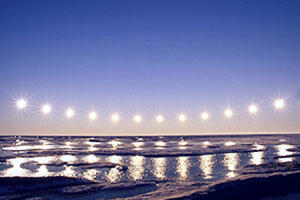
Path of the Midnight Sun photographed by Björn Diërg over the course of 3 hours from the South Cape of the Norwegian island of Spitsbergen near 78° North latitude. (Note that a total solar eclipse passed over Spitsbergen on March 20, 2015 C.E. )
In some places on earth the sun never sets below the horizon during certain times of the year. Midnight sun occurs in latitudes north and nearby to the south of the Arctic Circle, and south and nearby to the north of the Antarctic Circle where the sun remains visible at local midnight. If the weather is fair, the sun will be visible 24 hours a day in those places. At the northern most point in Finland, the sun does not set for 73 days during summer. In the case of midnight sun, a Hebrew Day begins when the sun reaches the lowest point on the horizon at sundown. The opposite phenomenon to midnight sun is polar night. The polar night occurs when the night lasts for more than 24 hours. This only occurs inside the polar circles.
The Day the Sun Stood Still
There is an interesting account of how the sun stood still in Joshua 10:1-15 that has perplexed many throughout the ages. Following his midnight march to rescue the city of Gibeon from the coalition led by the king of Jerusalem, Joshua pursued the Canaanite coalition eastward, down through the descent of Beth-horon, and then southward across the Valley of Aijalon. Joshua apparently commanded the sun and the moon to stand still, allowing the Israelites enough daylight to complete the rout before nightfall.
Joshua 10:7-15 So Joshua ascended from Gilgal, he and all the people of war with him, and all the mighty men of valor. And יהוה said to Joshua, "Do not fear them, for I have delivered them into your hand; not a man of them shall stand before you." Joshua therefore came upon them suddenly, having marched all night from Gilgal. So יהוה routed them before Israel, killed them with a great slaughter at Gibeon, chased them along the road that goes to Beth Horon, and struck them down as far as Azekah and Makkedah. And it happened, as they fled before Israel and were on the descent of Beth Horon, that יהוה cast down large hailstones from heaven on them as far as Azekah, and they died. There were more who died from the hailstones than the children of Israel killed with the sword. Then Joshua spoke to יהוה in the day when יהוה delivered up the Amorites before the children of Israel, and he said in the sight of Israel: "Sun stand still over Gibeon; and moon in the Valley of Aijalon." So the sun stood still, and the moon stayed until the people had revenge upon their enemies. Is this not written in the Book of Jasher? So the sun stood still in the midst of heaven, and did not hasten to go down on a perfect day. And there has been no day like that, before it or after it, that יהוה heeded the voice of a man; for יהוה fought for Israel. Then Joshua returned, and all Israel with him, to the camp at Gilgal.
Book of Jasher 88:60-65 And יהוה confounded them before the children at Israel, who smote them with a terrible slaughter in Gibeon, and pursued them along the way that goes up to Beth Horon unto Makkedah, and they fled from before the children of Israel. And while they were fleeing, יהוה sent upon them hailstones from heaven, and more of them died by the hailstones, than by the slaughter of the children of Israel. And the children of Israel pursued them, and they still smote them in the road, going on and smiting them. And when they were smiting, the day was declining toward evening, and Joshua said in the sight of all the people, "Sun stand still upon Gibeon, and moon in the Valley of Ajalon, until the nation shall have revenged itself upon its enemies." And יהוה hearkened to the voice of Joshua, and the sun stood still in the midst of the heavens, and it stood still thirty six moments, and the moon also stood still and hastened not to go down on a perfect day. And there was no day like that, before it or after it, that יהוה hearkened to the voice of a man, for יהוה fought for Israel.
There is a simple explanation for what happened, as the sun stands still at the summer solstice and at the winter solstice. A solstice is an astronomical event that happens twice each year, when the tilt of the earth's axis is most inclined toward or away from the sun, causing the sun's apparent position in the sky to reach its northernmost or southernmost extreme. The name is derived from the Latin sol (sun) and sistere (to stand still), because at the solstices, the sun stands still in declination; that is, the apparent movement of the sun's path north or south comes to a stop before reversing direction. The term solstice can also be used in a broader sense as the date when this occurs.
In the case of the battle between Israel and the Amorites, Seder Olam 11 says that the battle took place on Day 3 of Month 4. However, the account in Joshua 10:13 says that the sun stood still which means the event took place on the summer solstice. The correct way to determine when this battle occurred is to consult the Creation Calendar to see when Day 3 of Month 4 occurs on the summer solstice in the general period when Joshua was conquering the Promised Land. It is very easy to determine that this particular battle took place on Day 3 of Month 4 on Wednesday, July 6, 1394 B.C.E. on the proleptic (retro-calculated) Julian Calendar. The summer solstice occurred at 12 hours and 42 minutes Universal Time [± 17 minutes] on this date. The summer solstice also occurred on Day 3 of Month 4 in 1432 B.C.E. and 1337 B.C.E., but these dates do not fall within the general period when Joshua was conquering the Promised Land.
The account in Joshua 10:13 says that the sun stood still in the midst of heaven and did not hasten to go down on a perfect day. Some have understood that the sun appeared to stay in the same position in the sky for one whole day. However, the intended meaning is that the sun stayed above the horizon a long time before setting on the perfect day of the summer solstice. There has not been a day like it before or since. During the plagues of the Exodus, יהוה used hail in judgment on the Egyptians. However, in the Battle of Gibeon יהוה killed most of the Amorites with hail on the day of the summer solstice according to Joshua 10:11. For these reasons the Battle of Gibeon is unique in Israel's history.
The sun rose at 4:27 am and set at 6:41 pm giving Joshua 14 hours and 14 minutes of sunlight on the day of the Battle of Gibeon. The 30 minutes of morning civil twilight and 30 minutes of evening civil twilight gave Joshua an additional 60 minutes of useable light that day. The sun stood still on the day Joshua fought the Battle of Gibeon. The moon stayed visible in the sky over the Valley of Aijalon until it set at 9:05 pm on Day 3 of Month 4. Here Joshua and his armies finished the battle before night fell on the longest day of the year.
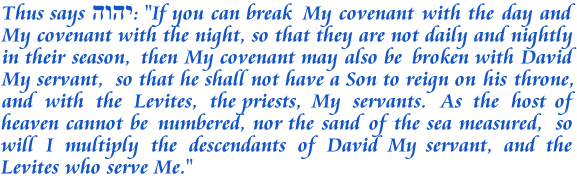
Although it is possible for the sun to stay above the horizon for one whole day during periods of midnight sun, it is impossible for the sun to stay in the same position in the sky for one whole day. Elohim created the cycle of the sun for days according to Genesis 1:14. The sun has been established to rise at one end of heaven and make its circuit to the other end of heaven according to Psalms 19:6. The cycle of the sun has been firmly established by יהוה to operate consistently from day to day according to Jeremiah 33:20-21. Although it has been misunderstood by many, the prophetic prose of Joshua 10:1-15 is a masterful piece of historical writing that communicates with the greatest precision, the geographical and chronological facts pertaining to the Battle of Gibeon.
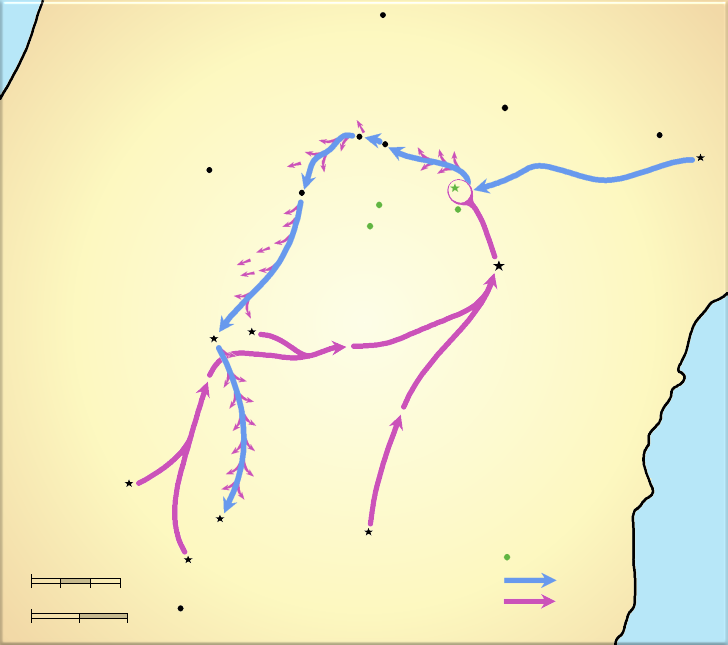
Battle of Gibeon
Timnath Sarah
Burial place of Joshua
Joshua and his army
ascend all night
to aid Gibeon
The King of Jerusalem and
his allies attack Gibeon
Gezer
Aijalon
Lower Beth Horon
Descent
of Beth Horon
Upper Beth Horon
Gibeon
Beeroth
Chephirah
Kiriath Jearim
G I B E O N I T E S
BERIAH
D E A D
S E A
Valley of
Aijalon
Jerusalem
Beth El
Noaron
Gilgol
Azekah
יהוה
casts down large
hailstones killing most
of the Amorites
Azekah
Jarmuth
Lachish
Makkedah
Eglon
Debir
Hebron
Gibeonite cities
Israelite Forces
Canaanite Forces
0
2
4
6 miles
0
5
10 km

TorahCalendar.com Copyright © 2008 through 2026 All rights reserved. Duplication prohibited. Contents protected by U.S. and international copyright Laws. TorahCalendar.com grants the right for individuals to quote or make copies of any of the original materials presented at TorahCalendar.com provided that such materials are not altered in any way, retain all unaltered Copyright notices and are never used or distributed for any form of pecuniary gain or profit.